
Feature #1196
open

Adding the sale price in google shopping feed
0%
Description
We need to separate for google feed our promo price and old price
Files
| vim_goog3_xml.jpg (109 KB) vim_goog3_xml.jpg | |||
| vim_goog3_xml.jpg (113 KB) vim_goog3_xml.jpg |
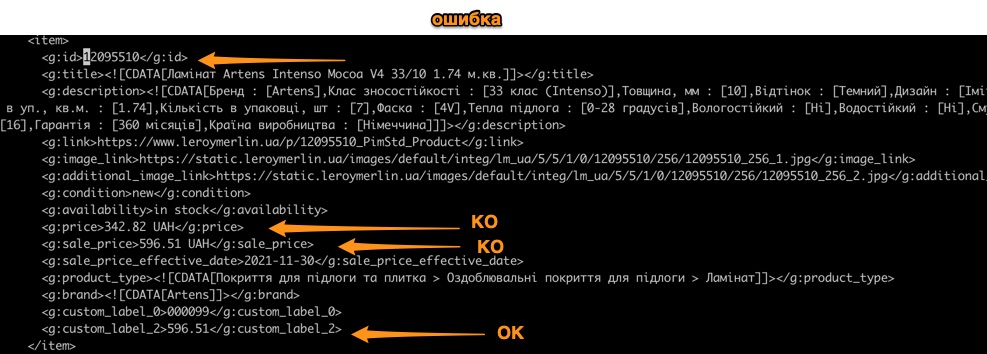
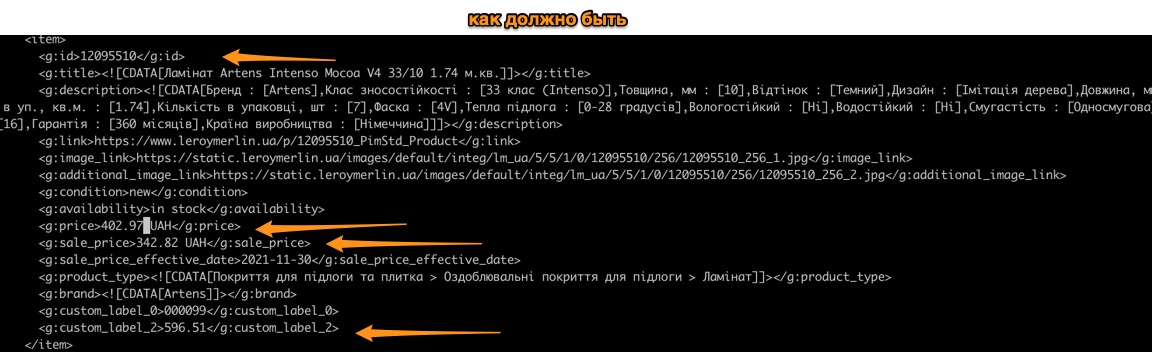
 Updated by Yevgen Voronetskyy over 6 years ago
- Status changed from New to In Progress
- Assignee set to Anonymous
Please, specify the corresponding tag names for promo Price and old price.
Updated by Anonymous almost 5 years ago
- Project changed from 30 to Google Analytics
- Subject changed from Promo price in google feed to Adding the sale price in google shopping feed
- Assignee changed from Anonymous to Yevgen Voronetskyy
Need to add the new attributes in the Google Shopping Feed [sale_price] and [sale_price_effective_date].
See the article, where it is described all about the attributes https://support.google.com/merchants/answer/6324471?hl=ru.
Cases:
1) Products without the discounts
[sale_price] - empty
[price] = our current price for the product (main price)
[sale_price_effective_date] - empty
2) Products with the label type "WEB_PRICE"
[sale_price] = webPrice attribute in Opus
[price] = our current price for the product (main price)
[sale_price_effective_date] = labelEndDate attribute in Opus
2) Products with the label type "SALE"
[sale_price] = our current price for the product (main price)
[price] = oldPrice attribute in Opus
[sale_price_effective_date] = labelEndDate attribute in Opus
3) Products with inverted secondary price without discounts
[sale_price] - empty
[price] = secondary price
[sale_price_effective_date] - empty
4) Products with inverted secondary price with label type "WEB_PRICE"
[sale_price] = secondary price that we calculate from the webPrice attribute
[price] = secondary price
[sale_price_effective_date] = labelEndDate attribute in Opus
5) Products with inverted secondary price with label type "SALE"
[sale_price] - secondary price
[price] = secondary price that we calculate from the oldPrice attribute
[sale_price_effective_date] - labelEndDate attribute in Opus
Updated by Yevgen Voronetskyy over 4 years ago
- Assignee changed from Yevgen Voronetskyy to Mykola Romanov
workload estimate
- use latest version of wikeo-business jar (contains some fixes for labels) - 1 day
- add customLabel visibility in google-feed - 1 day
- implement sale-price/price logic for 4 use-cases - 2 days
- jUnit tests - 1 day
Total: 5 days
Updated by Anonymous over 4 years ago
Examples:
SALE - 11739161
WEB PRICE - 11860086
 Updated by Mykola Romanov over 4 years ago
we have a problem with the sale end date. As this is the only date in the feed, Google seems to think that this is the sale start date, so everything goes wrong.
@o.skrypek , can we add "sale start date" to the feed as well?
Updated by Anonymous over 4 years ago
I check the article about this attribute and here I found that we need to put the information like this http://prntscr.com/1xhxpnk. So start and end date should be in this attribute.
https://support.google.com/merchants/answer/6324460#zippy=%2C%D0%B2%D0%B0%D1%80%D0%B8%D0%B0%D0%BD%D1%82%D1%8B
I propose use TODAY for start date. What are you thinking about that @m.romanov?
Updated by Mykola Romanov over 4 years ago
@o.skrypek , check starting and ending date with Yuri from Promodo please
Updated by Mykola Romanov over 4 years ago
the price swithcing is not taken into account in the latest version. Regardless of the sale presence on the article.
Maybe you forgot to integrate the price swithching models to the war?
Example WITHOUT sale:
https://prnt.sc/1xlr6sr
https://prnt.sc/1xlre2l
Example WITH sale:
https://prnt.sc/1xlprca
http://prntscr.com/1y6exye
So both are KO
Updated by Anonymous over 4 years ago
Mykola Romanov wrote:
the price swithcing is not taken into account in the latest version. Regardless of the sale presence on the article.
Maybe you forgot to integrate the price swithching models to the war?Example WITHOUT sale:
https://prnt.sc/1xlr6sr
https://prnt.sc/1xlre2lExample WITH sale:
https://prnt.sc/1xlprca
http://prntscr.com/1y6exyeSo both are KO
In fact, the second example should be
SALE PRICE 399 uah/m2
PRICE 469 uah/m2 (and not 596.51 uah/pack)
Updated by Anonymous over 4 years ago
Olena Skrypek wrote:
I check the article about this attribute and here I found that we need to put the information like this http://prntscr.com/1xhxpnk. So start and end date should be in this attribute.
https://support.google.com/merchants/answer/6324460#zippy=%2C%D0%B2%D0%B0%D1%80%D0%B8%D0%B0%D0%BD%D1%82%D1%8BI propose use TODAY for start date. What are you thinking about that @m.romanov?
We decide to remove this attribute from the feeds - [sale_price_effective_date]. So, please, delete it at the next version.
Updated by Yevgen Voronetskyy over 4 years ago


Please, confirm, that the last screen is correct and you want this solution.